

AI Video Extender: the frame you cut on decides whether the seam shows
A video extender does not stretch a clip — it reads the last frames and generates what happens next, so the frame you stop on matters more than anything you type. Covers cutting on a rest frame, writing prompts about the next action, and the four kinds of footage that fall apart.
On this page
A video extender is not a slow-motion button and it is not a stretch tool. It reads the closing frames of a clip, works out which way the motion is heading, and generates entirely new footage that continues from that point. Nothing gets interpolated; the second half is invented. That single detail moves the real decision out of the prompt box and onto the timeline, because the frame where you stop the original clip is the frame the model treats as its starting point.
Most people who try a video extender spend their time rewriting the description. Then they blame the model when the seam jumps. The seam almost always started with the cut.
Cut on a rest frame, not a motion frame
Find a moment where the action has finished and the frame is still. A person who has walked across the room and stopped. A hand that has set a cup down and let go. A camera that has finished its push and settled. That still frame is the cleanest possible starting point, because there is only one thing the model can plausibly do next: keep the scene alive without inventing a direction.
Cut mid-stride and the opposite happens. The model receives a frame of a person with one foot off the ground, body leaning, hair displaced, and it has to infer both the remaining half of that step and what comes after it. Half the time it finishes the step badly, and the first second of the new footage shows a limb snapping into place or a torso drifting a few pixels sideways before the motion normalises.
The practical way to find a rest frame is to scrub the last two seconds rather than watch them. In most players you can step frame by frame with the arrow keys once paused. Look for the last frame where nothing is moving relative to the frame before it. If the subject is still walking when the clip ends, trim backward until you reach the pause between two movements — a turn that has completed, a gesture that has landed, a beat where the shoulders stop.
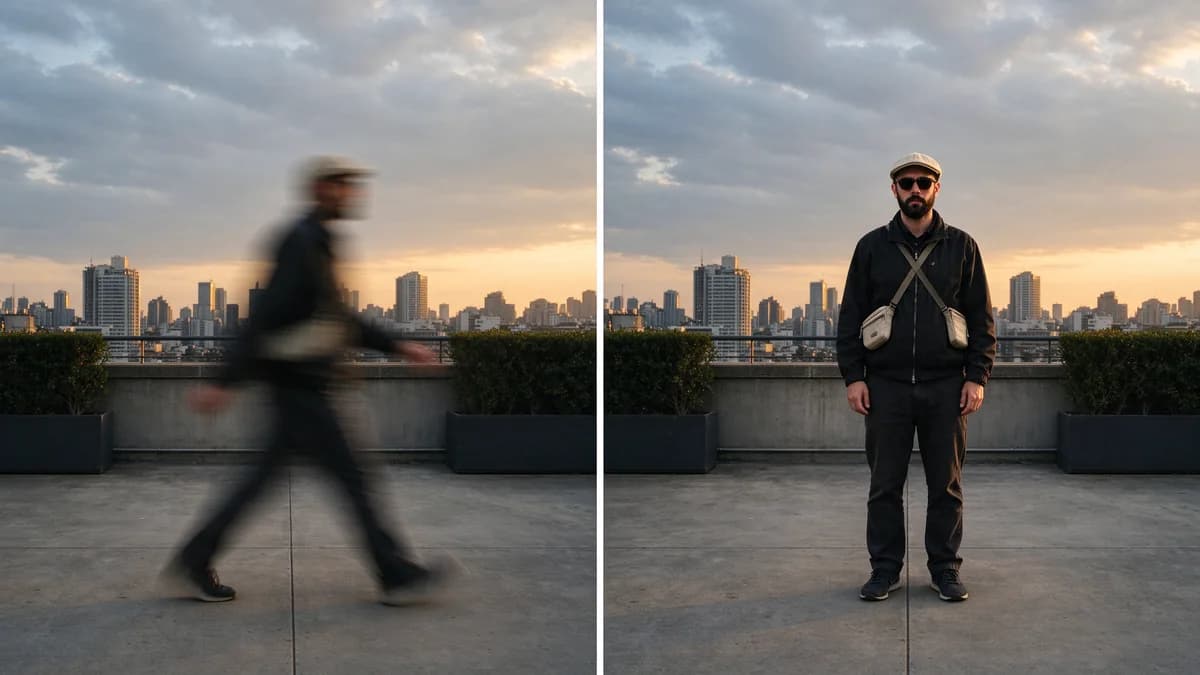
The left frame is what a mid-motion cut hands the model. The right frame is what a rest cut gives it — same scene, same light, only the stopping point differs.
Write what happens next, not what is already there
This is the second most common mistake, and it is a grammar problem more than a creative one. People describe the clip they already have instead of the moment they want.
Wrong: A man standing on a rooftop at sunset, city skyline behind him, warm light, cinematic.
Every word of that is already true of the frame the model received. It adds no information about direction, so the model defaults to the safest possible continuation: hold the shot, drift slightly, fade. You get two seconds of nothing.
Right: He turns his head toward the skyline, then walks slowly to the railing and rests both hands on it.
That version gives a sequence — turn, walk, place hands — with a clear spatial destination. The model has somewhere to go.
Three habits make next-action prompts work:
Use verbs of motion, not adjectives of mood. "Cinematic, warm, beautiful" describes quality the model already infers from the input frame. "Lifts, turns, steps, reaches, settles" describes change, and change is what fills time.
Give the action a place to end. An action with no destination runs out of energy and starts looping. "She walks" has nowhere to go; "she walks to the window and looks out" resolves.
Keep it to one or two beats. Fifteen to thirty words is plenty. A four-stage sequence usually produces a rushed, crammed result, because the model has to fit everything into a fixed number of seconds.
End the first segment clean
If you plan to extend twice — original clip, plus five seconds, plus five more — the ending of the first extension matters as much as the ending of your source. The second extension reads the last frames of the first one, so any mess at that boundary multiplies.
Clean endings come in three shapes. The subject leaves the frame entirely, which resets the composition. The subject comes to rest and holds, which gives the next segment the same advantage your first cut had. The camera stops moving, which removes the risk of the second segment picking up a pan that was already decelerating.
The messy case is a segment that ends mid-gesture. A hand still rising, a coat still swinging, a head still turning — the next extension has to resolve that gesture before it can do anything of its own, and it usually resolves it wrong. If you cannot avoid it, give the second prompt an action that absorbs the unfinished movement: an incoming gesture described as finishes lifting the cup and sets it down will close the loop instead of fighting it.
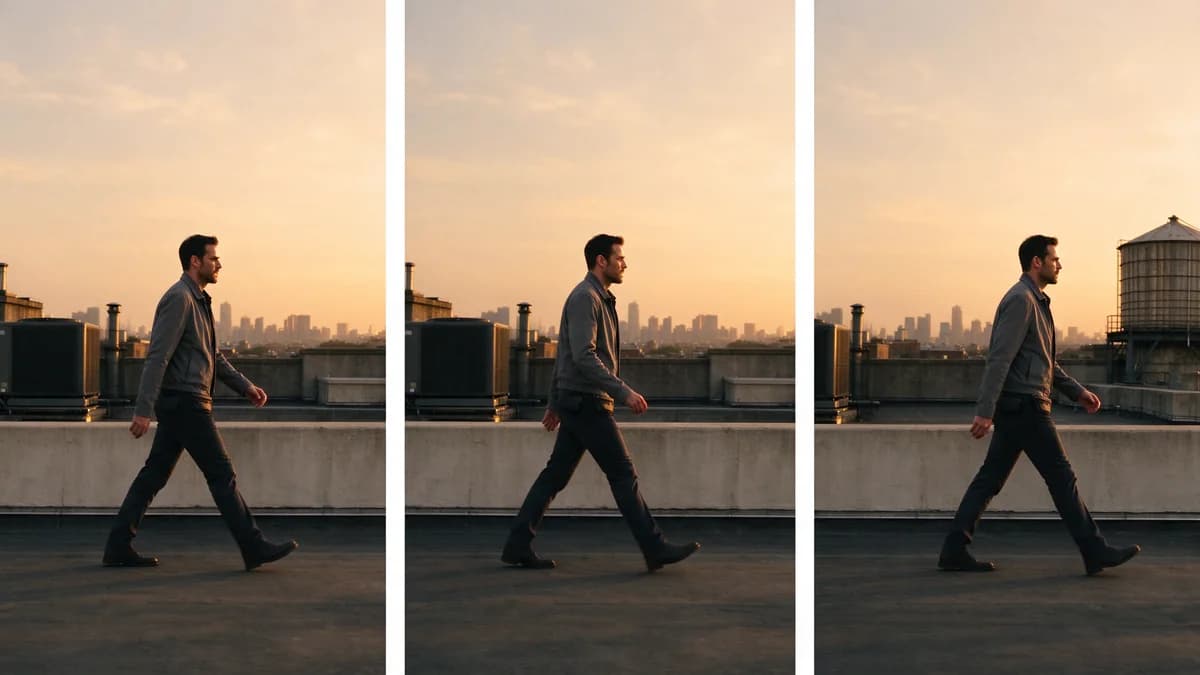
All three frames come from one continuous take. Everything past the third frame is generated, which is why the last frame — not the first — has to be the clean one. The earlier frames only tell the model which way the motion was already going.
Four kinds of footage that fall apart
Some source material resists a video extender no matter how well you cut and how carefully you write. It is worth knowing which before you spend an afternoon on a prompt.
Fast lateral camera moves. A whip pan or a fast truck across a room gives the model almost no stable geometry to hold onto — every frame is a new composition. Extended footage tends to stutter, with the background jumping backward between generated frames. If the move is essential, cut at the very end of the pan once the camera has settled on something.
Hands and fingers in close-up. Hands are the hardest thing to keep coherent across a generated second, and a close-up removes every cue the model could use to hide an error. A hand entering the frame from a distance is fine; a hand filling a third of the frame is a coin flip. Pull the crop wider before extending, or cut before the hand arrives.
Readable text in frame. Signs, labels, phone screens, subtitles burned in — anything the model reads gets re-invented, and letterforms drift into nonsense within a second or two. Either reframe so the text sits at the edge, or accept that the extended section will not contain it.
Several people moving independently. Two or three subjects each doing their own thing break the model's attention budget. It will track one and let the others blur, slide, or merge. If the shot has a crowd, cut on a moment where they are broadly still — a group posing, a pause in a conversation.
Looping motion versus still motion
There is a difference between footage that can absorb ten seconds and footage that can absorb two, and it is not about how interesting the shot is.
Cyclic motion — walking, circling, a repeated gesture, a dancer running a sequence — extends well, because each cycle gives the model a fresh, self-similar pattern to continue. That is also why it can extend too well: at around ten to twelve seconds, walking starts to look like walking in place, and a repeated gesture becomes visibly mechanical.
Low-motion footage has the opposite problem. Someone seated, talking quietly, barely shifting weight, gives the model nothing to build on. Extensions of that material often hold the pose and then introduce a small, unmotivated movement — a head tilt that repeats, a blink that fires twice in a row — because the model has to do something with the time.
The fix is not longer prompts. It is shorter segments. Two five-second extensions with a described action between them will usually read better than one ten-second extension of a static scene. If you need the length, add a reason for movement: someone enters, a door opens, the subject stands up.
Where to cut, by footage type
| Footage | Where to cut | What to expect | Usual problem |
|---|---|---|---|
| Subject walks through frame | After they stop, or after they exit entirely | Smooth continuation, easiest case | Cutting mid-stride causes a limb to snap |
| Subject seated, talking | On a pause between sentences | Holds well for 5s, drags past 10s | Small repeated movements appear |
| Cyclic action (walking, dancing, spinning) | At the end of a full cycle | Continues cleanly, suits longer extensions | Starts to look like a loop after ~12s |
| Camera pan or dolly | Once the camera has settled | Stable geometry, clean seam | Cutting mid-pan stutters the background |
| Hands or object in close-up | Before the object fills the frame | Workable if the crop is wide | Fingers merge or duplicate |
| Several people in shot | On a moment where most are still | One subject tracked, others soften | Background figures drift or merge |
| Readable text in frame | Before the text enters, or edge-framed | Fine as long as no text is generated | Letterforms turn into shapes |
The order to work in
Prompt-first is the wrong sequence. Work backward from the material.
- Pick the clip by length, not by content. Anything under three seconds leaves the model too few frames to infer motion from. Five to ten seconds is the comfortable range.
- Scrub the last two seconds frame by frame. Pick a rest frame or a clean exit.
- Write one action, with a destination. Turn toward the window and stop. Set the cup down and let go.
- Generate once, and watch the join before anything else. Loop the last half second of the original into the first half second of the new clip. If the join holds, the rest is worth evaluating; if it jumps, nothing later matters.
- Fix the prompt, not the source. Every retry should change one thing about the description. Rewriting the prompt three times with the same cut tells you whether the problem is wording. Re-cutting on a different frame tells you whether it is geometry.
- Extend in stages. Two short extensions with a described action between them beat one long one, and each stage is a chance to correct course.
What a video extender will not do
It does not add length by slowing a clip down — that is frame interpolation, and it produces a different artefact set entirely. It does not cut, join, retime, or reorder footage; those are timeline operations, and this is a generation operation. It does not add music, voice, captions, or transitions. And it does not guarantee an exact duration: you get roughly the length you ask for, but the content of that length is invented, so the last beat may land earlier or later than you pictured.
What it does well is narrow and useful. You have a strong five seconds and you need eight. You have a shot that ends too abruptly and needs a beat of resolution. You have a loop you want to run a little longer without re-shooting. Those are the cases where cutting on a rest frame and describing the next action will give you footage that reads as one continuous take — and where the seam disappears, which is the only result that matters.
If you want to see how the rest of the pipeline fits together, the walkthrough on how to make AI videos covers source selection and shot planning before generation, and the guide to motion control covers the opposite direction — driving a photo from existing footage. The extension tool itself is at video extender.
Related articles
Related tools and templates
AI Video Extender
Upload a short video and describe what happens next. AI continues your video.
AI Video Editor
Upload a video and describe your changes. Add reference images when supported; limits depend on the selected model.
AI Image to Video
Upload a photo and turn it into a short video with natural motion. Add an end frame to control where the shot finishes.