
How to Make Halloween Cartoon Videos in Wan 3.0: Styles, Prompts and Settings
A practical workflow for cute, family-friendly Halloween cartoons in Wan 3.0: choose one style, lock characters with first-frame image-to-video, write structured prompts, tune settings and fix common artifacts.
On this page
Short Halloween videos are everywhere on TikTok, Instagram Reels and YouTube Shorts. If you want clips that feel cute and festive rather than frightening, and you would rather not open a full animation suite, Wan 3.0 is a practical choice: it supports text-to-video, image-to-video with first-frame control, multi-image references and native audio, and can render up to 30 seconds of 1080p video in one pass. That is enough for cartoon stories, greeting clips and social media content.
Here is the workflow in the order it usually works best: pick a style, choose a generation mode, write the prompt, set the parameters, fix common problems, and finish in post. The prompt structure near the end is ready to adapt.
1. Lock the style before anything else
Wan 3.0 follows style keywords closely. Decide on one style first, then fill in characters and scenes. Mixing several styles in one prompt often produces footage that is half 3D and half hand-drawn.
Styles that work well for a friendly Halloween short:
- 3D cartoon (Pixar-like): rounded shapes, soft materials, warm rim light. Great for jack-o'-lanterns, candy buckets and little ghosts.
- 2D hand-drawn: clean black outlines, flat colors, a vintage storybook feel. Very stable when the action is simple.
- Claymation / stop motion: tactile clay surfaces, small movements, warm low-key lighting. Possibly the strongest holiday mood.
- Chibi: tiny bodies, big eyes, oversized witch hats and candy buckets. Ideal for quick, expressive social clips.
Whatever you choose, state the tone explicitly: "whimsical, gently spooky, no gore, family-friendly". It keeps the model away from realistic horror.
2. Pick the generation mode for the job
Wan 3.0 offers several modes, and they suit different tasks:
Text-to-video: fast idea testing
Start from text alone. It is the quickest way to explore a concept, such as a dancing jack-o'-lantern or a drifting friendly ghost, and a good way to get a first version before refining.
Image-to-video with first-frame control: the most consistent characters
Create a cartoon character sheet first, then use it as the first frame. The face, costume and body proportions stay anchored, which fixes the most common AI cartoon problem: a face that changes from shot to shot. Use this mode whenever the short has a recurring main character.
Multi-image reference: for series and multiple shots
Provide several references covering the character, the palette and the background. This suits multi-shot projects that keep the same witch, black cat or pumpkin character. Explain what each reference is for, for example "the first image defines the character, the second defines the color palette".
3. Write the prompt as a formula
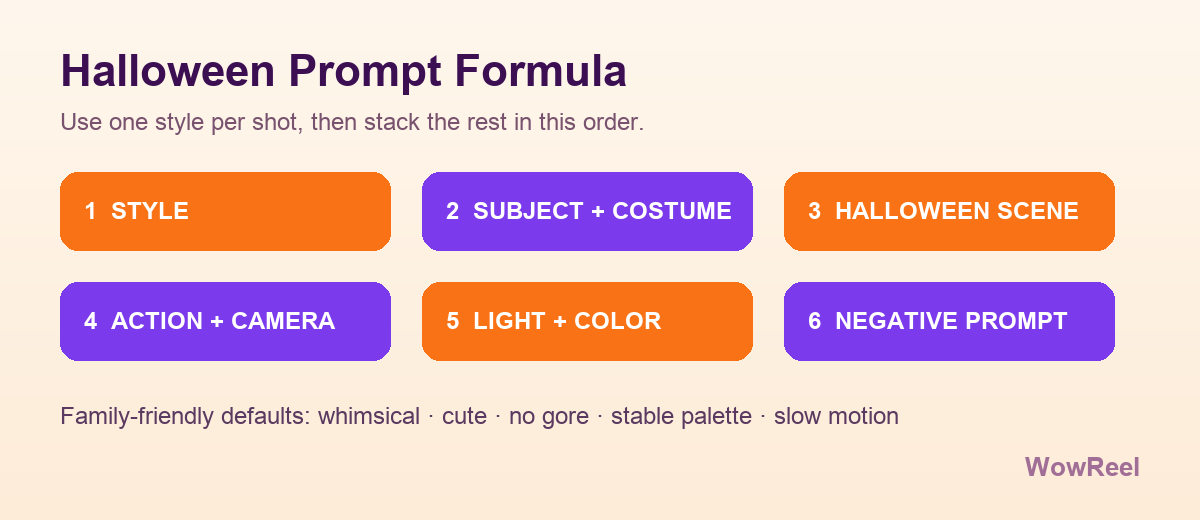
A reliable Wan 3.0 Halloween prompt follows this order:
Style + subject and costume + Halloween scene + action and camera + light and color + negative prompt
In practice:
- Style: commit to one, such as "Pixar-style 3D cartoon".
- Subject and costume: who the character is, what they wear, what they carry.
- Scene: a forest path, a wooden fence, a pumpkin patch, a doorway.
- Action and camera: walking slowly, drifting gently, a slow push-in, a tracking shot.
- Light and color: orange-and-purple twilight, warm rim light, low key.
- Negative prompt: realistic photo, gore, blur, distorted limbs, flickering face.
Example 1: 3D cartoon ghost
``` Pixar-style 3D cartoon, a cute little ghost wearing a tiny wizard hat, carrying a glowing pumpkin candy bucket, walking slowly along a forest path lined with jack-o'-lanterns, bats flying gently in the background, soft orange and purple twilight, slow tracking shot, smooth motion, warm rim light, whimsical Halloween atmosphere, 30fps, family-friendly, clean frame. Negative: realistic photo, human face, gore, blur, distorted limbs, flickering face, messy outlines. ```
Example 2: 2D hand-drawn chibi black cat
``` 2D hand-drawn cartoon, clean black outlines, flat colors, a chibi black cat in a vampire cape jumping onto a wooden fence, full moon and twisted bare trees behind it, orange maple leaves falling, subtle camera pan, vintage children's storybook illustration, soft orange, purple and black palette, gentle motion. Negative: 3D render, photorealistic, heavy shadows, horror, blood. ```
Example 3: a 30-second claymation story with timestamps
Wan 3.0 accepts simple timestamp directions for a longer single shot:
``` Claymation stop-motion style, a short Halloween story. 0-6s: a smiling pumpkin character lights its candle and the warm glow grows. 6-15s: it hops forward twice while candy corn bounces beside it. 15-24s: a friendly little ghost floats over and waves. 24-30s: the two characters stand together and smile at the camera. Soft autumn night lighting, slight camera movement, smooth clay texture, cozy and slightly playful. Negative: fast shaking, morphing objects, dark horror, grain. ```
Longer is not better. Be specific, and avoid packing five actions into one sentence.
4. Set the parameters before you generate
- Aspect ratio: 9:16 for Reels, TikTok and Shorts; 16:9 for YouTube and websites; 1:1 for Instagram feeds.
- Resolution: 720p for quick motion tests, 1080p for the final render.
- Duration: 2 to 30 seconds. Cartoon storytelling works best around 10 to 20 seconds; longer shots tend to lose character consistency.
- Audio: turn on native audio generation and describe the sound, for example "soft playful Halloween background music, gentle xylophone, breeze, no loud jump scares".
- Seed: when a character look works, save the seed and reuse it with the same references across shots.
5. Fix the usual cartoon artifacts
Most problems fall into a few categories:
- The face and shape keep changing: switch to first-frame image-to-video with a clear character reference; reduce the amount of motion; avoid complex hand poses.
- Outline flicker or color shift: add "stable color palette, consistent line art, no flicker" and keep one fixed color reference when using multiple images.
- Messy or shaky motion: replace "wild dancing, fast spinning" with "slow pan, gentle sway, subtle bounce". Wan 3.0 handles slow, predictable motion better.
- It drifts into horror: state "whimsical, cute, family-friendly, no horror, no sharp teeth" and block realistic faces, blood and sharp props in the negative prompt.
- Garbled on-screen text: video models are unreliable at typography. Add titles and captions in post.
6. Finish in post
Wan 3.0 gives you clean footage; a short edit makes it feel complete:
- Assemble the shots in CapCut or Premiere and control the rhythm.
- Add a simple text overlay such as "Happy Halloween" or a campaign line.
- Layer in ambient sound: rustling leaves, an owl, crinkling candy wrappers.
- Do a light grade that pushes orange and purple and unifies the shots.
- Export both 9:16 vertical and 16:9 horizontal versions for different platforms.
7. Run the workflow on WowReel
If you are producing on WowReel, the same plan applies. Use image-to-video to upload a character image as the first frame, and add a last frame when you need to control the ending. Multi-image references, up to three images, work well for a series of shots. Test the motion at 720p, then render 1080p when it looks right. When you want to start from text, use text-to-video. A single action description is enough, up to 2,000 characters; shots can be 5 or 10 seconds and edited together into a complete Halloween story.
The credit cost is shown before you generate, and failed generations are refunded (except when content review fails). Finished work is kept for seven days, so download it in time.
FAQ
Can I make a full Halloween animated series? A single generation is capped at 30 seconds. For longer stories, split the script into shots, lock the same character references, generate each shot, then edit them together.
Which reference method is best for keeping a cartoon character consistent? A clean frontal character image used as the first frame is the most stable. Multi-image references are more flexible but need more prompt iteration.
What frame rate should I use? 30fps is the default and looks smooth. Add "24fps animation" to the prompt if you want an older, hand-animated feel.
How long should the prompt be? Cover the six parts and stop. Make the subject, action and style clear before adding atmosphere.
Final thoughts
A good Halloween cartoon short is less about a complicated prompt and more about committing to one style, locking the character, and slowing the motion down. With the style + subject + scene + action + light + negative structure, first-frame image-to-video and a fixed seed, you can produce cute, shareable Halloween clips reliably.